WhatsApp marketing is a way for businesses to promote products, share offers, answer customer questions, and build relationships directly on WhatsApp. It helps brands reach people where they already spend time, making communication faster, more personal, and easier to act on. But doing it well is not just about sending random messages. You need the right strategy, useful content, proper timing, and tools like WhatsApp Business or WhatsApp Business API to manage conversations at scale. In this blog, you will understand what is WhatsApp Marketing, how to do marketing through WhatsApp, and what is WhatsApp Business API in simple terms.
What is WhatsApp Marketing?
WhatsApp marketing is the process of using WhatsApp to communicate with customers for promotions, updates, lead generation, sales, and customer support. Instead of depending only on emails, calls, or social media ads, businesses can use WhatsApp to talk directly with people in a more personal and quick way.
For example, a salon can send appointment reminders, an ecommerce brand can share order updates, a travel agency can send package details, and a clinic can confirm consultations through WhatsApp.
The biggest strength of WhatsApp marketing is simple: it feels like a conversation, not a traditional advertisement. Customers can ask questions, check details, share requirements, and make decisions faster.
WhatsApp also supports business features that help brands showcase products, build relationships, and improve customer communication. WhatsApp’s official business page says WhatsApp Business helps brands showcase products and services, increase sales, and build relationships with customers.
Why is WhatsApp Marketing Important for Businesses?
Today, customers want quick answers. They do not always want to fill long forms, wait for email replies, or call customer care numbers. They prefer a simple chat where they can ask questions and get instant support.
This is where WhatsApp marketing becomes powerful.
It helps businesses:
- Connect with customers directly.
- Share offers and updates instantly.
- Generate leads from ads and websites.
- Improve customer support.
- Send reminders and confirmations.
- Build trust through one-to-one communication.
- Increase repeat sales with personalized messages.
For small businesses, WhatsApp marketing can work as a direct sales channel. For growing businesses, it can become a complete customer communication system when used with automation, CRM, and WhatsApp Business API.
How Does WhatsApp Marketing Work?
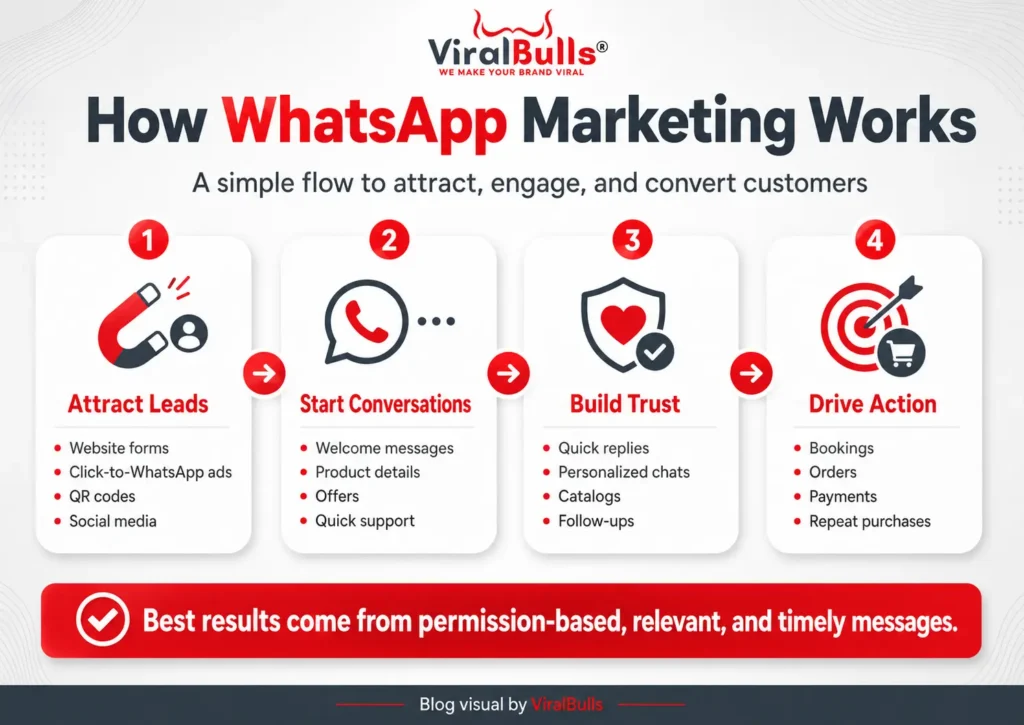
WhatsApp marketing works best when it follows a simple journey.
First, the customer shows interest. This can happen through a website form, Instagram ad, Facebook ad, Google ad, QR code, store visit, or previous purchase.
Second, the business starts a useful conversation. This may include product details, pricing, offers, appointment slots, order updates, or consultation support.
Third, the customer takes action. They may book an appointment, buy a product, ask for more details, visit the store, or complete payment.
The goal is not to spam people. The goal is to make communication easier and more helpful.
A good WhatsApp marketing strategy always focuses on permission, relevance, timing, and value.
How to Do Marketing Through WhatsApp?
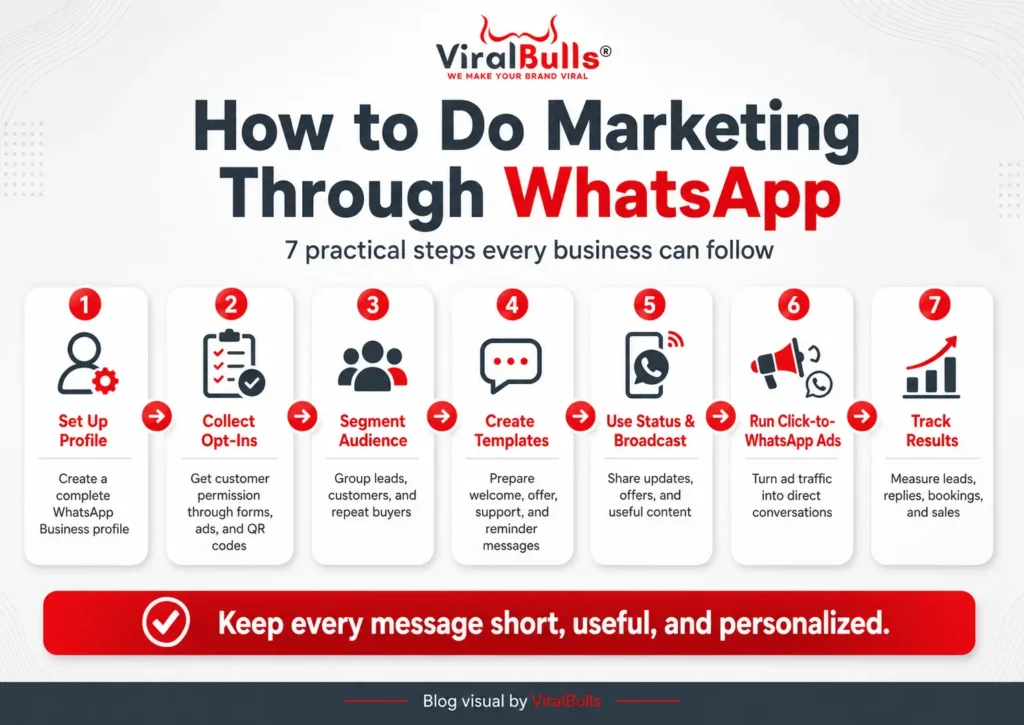
If you are wondering how to do marketing through WhatsApp, start with a proper setup and a clear plan. Do not randomly send messages to everyone. Build a system that helps customers and supports your business goals.
1. Create a WhatsApp Business Account
The first step is to create a WhatsApp Business account. The WhatsApp Business app is made for businesses and includes features like quick replies, away messages, labels, status updates, product catalog, and click-to-WhatsApp ads. The app listing also mentions that it is free to download, with some paid features available.
Your business profile should include:
- Business name
- Logo
- Business description
- Website link
- Address
- Working hours
- Product or service catalog
- Contact details
A complete profile makes your business look more trustworthy.
2. Build a Permission-Based Contact List
Do not buy random WhatsApp numbers. It can damage your brand and may lead to poor responses.
Instead, collect contacts through genuine sources like:
- Website inquiry forms
- Lead generation ads
- Store visitors
- Existing customers
- QR codes
- Event registrations
- Newsletter signups
- Click-to-WhatsApp ads
When people choose to contact you, they are more likely to respond positively.
3. Segment Your Audience
Not every customer should receive the same message.
You can divide your audience into groups like:
- New leads
- Existing customers
- Repeat customers
- High-intent buyers
- Inactive customers
- Location-based customers
- Product-specific customers
- Service-specific customers
For example, a new lead may need product education, while an existing customer may need a reorder reminder or loyalty offer. Segmentation makes WhatsApp marketing more personal and effective.
4. Create Useful Message Templates
Prepare messages for common situations. This saves time and keeps your communication professional.
You can create templates for:
- Welcome message
- Product inquiry
- Service inquiry
- Appointment confirmation
- Order confirmation
- Payment reminder
- Feedback request
- Festival offer
- Abandoned cart reminder
- Thank you message
Keep every message short, clear, and helpful.
5. Use WhatsApp Status for Promotions
WhatsApp Status can be used to share updates without directly messaging every customer.
You can post:
- Daily offers
- New arrivals
- Behind the scenes content
- Customer reviews
- Product benefits
- Before and after results
- Event updates
- Limited time deals
Status works well because it feels less pushy than direct promotional messages.
6. Use Broadcast Lists Carefully
Broadcast lists help you send one message to many people. But this should be used carefully.
Do not send too many offers. Do not send irrelevant messages. Do not use spammy language.
A good broadcast message should have:
- A clear first line
- Simple benefit
- Short explanation
- One call to action
- Easy reply option
Example:
“Hi, our weekend skincare offer is live. Get a free skin consultation with selected treatments. Reply BOOK to check available slots.”
7. Run Click-to-WhatsApp Ads
Click-to-WhatsApp ads are useful when you want direct inquiries. Instead of sending users to a website page, you can send them directly to a WhatsApp chat.
This works well for:
- Salons
- Clinics
- Real estate
- Travel agencies
- Coaching institutes
- Ecommerce brands
- Local service businesses
- Event bookings
The benefit is simple. The customer does not need to search for your number. They tap the ad and start chatting instantly.
8. Automate Basic Replies
As inquiries grow, replying manually becomes difficult. This is where automation helps.
You can automate:
- Greeting messages
- Away messages
- Frequently asked questions
- Product details
- Appointment confirmations
- Order updates
- Lead qualification questions
Automation should not feel robotic. Keep it simple and human. The best experience is a mix of automation and real team support.
9. Track Your Results
If you want better results from WhatsApp marketing, track your performance.
Important metrics include:
- Number of inquiries
- Response rate
- Number of qualified leads
- Number of bookings
- Sales generated
- Repeat customers
- Link clicks
- Customer response time
- Conversion rate
Tracking helps you understand which messages, offers, and campaigns are actually working.
Best WhatsApp Marketing Strategies for Better Results
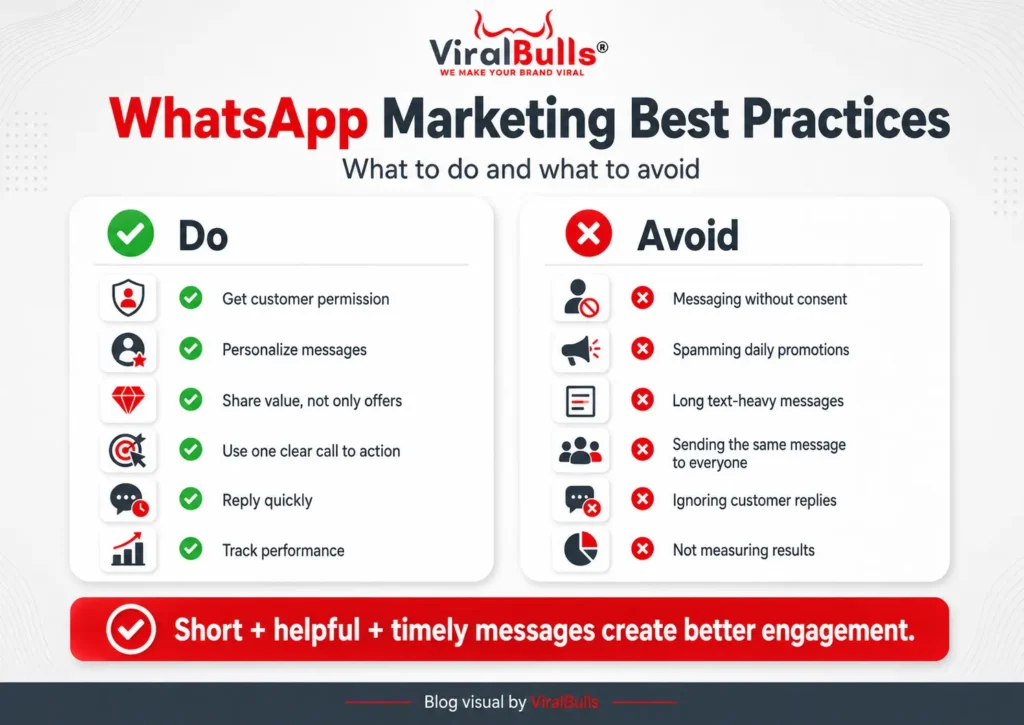
WhatsApp marketing becomes powerful when your messages are useful, timely, and relevant.
Keep Messages Short and Direct
People open WhatsApp for quick communication. They do not want to read long promotional paragraphs.
Write like a human. Keep the message simple.
Instead of writing:
“We are pleased to announce our exclusive premium skincare service package specially designed for your beauty needs.”
Write:
“Your skin deserves extra care this week. Book a skincare session and get a free consultation.”
Personalize Your Messages
Personalization can improve response quality. Use the customer’s name, previous interest, location, or purchase history when possible.
Example:
“Hi Riya, your last hair spa was 6 weeks ago. This is a good time for your next session. Would you like us to share available slots?”
This feels more helpful than a generic message.
Share Value, Not Just Offers
If every message is about discounts, customers may stop paying attention.
Share useful content like:
- Tips
- Guides
- Product usage ideas
- Care instructions
- Seasonal reminders
- Expert advice
- FAQs
- Comparison posts
For example, a skincare brand can send monsoon skincare tips. A travel agency can share visa checklist points. A clinic can share post-treatment care instructions.
Use Rich Media
WhatsApp allows businesses to share images, videos, documents, links, and catalogs. This makes it easier to explain products and services.
The WhatsApp Business Platform supports rich media, interactive CTAs, dynamic product lists, and conversational flows for business communication.
You can use:
- Product images
- Before and after photos
- Service videos
- PDF brochures
- Price lists
- Catalog links
- Location links
- Payment links
Good visuals can make the customer decision faster.
Use One Clear Call to Action
Every WhatsApp message should tell the customer what to do next.
Examples:
- Reply YES to know more.
- Tap here to book your appointment.
- View our catalog.
- Claim your offer today.
- Reply 1 for pricing.
- Reply BOOK for available slots.
Do not add too many actions in one message. One message should have one main goal.
What is WhatsApp Business API?
Many people search for what is whatsapp business api because they want to understand how bigger brands manage so many WhatsApp chats.
WhatsApp Business API is an advanced solution for businesses that need automation, multiple team members, CRM integration, and large-scale messaging. Today, Meta commonly refers to this as the WhatsApp Business Platform. Meta’s developer documentation describes the WhatsApp Business Platform as a way to send and receive WhatsApp messages through Cloud API and other business messaging tools.
In simple words, the WhatsApp Business app is good for small businesses that manage chats manually. WhatsApp Business API is better for businesses that need a proper system.
It can help with:
- Automated customer journeys
- Chatbots
- CRM integration
- Multi-agent support
- Message templates
- Order updates
- Lead management
- Customer support workflows
- Marketing campaigns
- Analytics and reporting
If your business receives many inquiries every day, the WhatsApp Business API can save time and improve customer experience.
WhatsApp Business App vs WhatsApp Business API
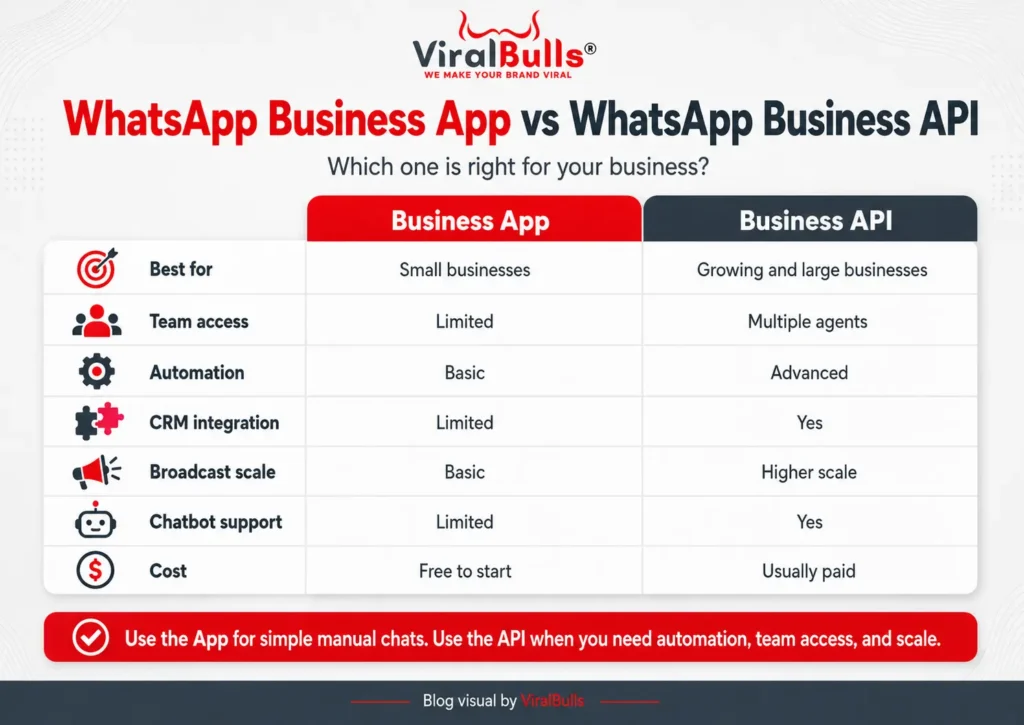
| Feature | WhatsApp Business App | WhatsApp Business API |
|---|---|---|
| Best For | Small businesses | Growing and large businesses |
| Setup | Easy app setup | Requires platform or developer setup |
| Team Access | Limited | Multiple agents possible |
| Automation | Basic | Advanced |
| CRM Integration | Limited | Yes |
| Chatbot Support | Limited | Yes |
| Broadcast Scale | Basic | Higher scale with approved templates |
| Analytics | Basic | Advanced, depending on provider |
| Cost | Free to start | Usually paid |
If you are a small business, start with the WhatsApp Business app. If you are getting a high number of leads and need automation, then move to WhatsApp Business API.
Benefits of WhatsApp Marketing
WhatsApp marketing is useful because it supports both sales and customer service.
1. Faster Communication
Customers can ask questions and get quick answers. This improves the chance of conversion.
2. Better Customer Trust
A WhatsApp chat feels personal. When customers can directly talk to a brand, trust improves.
3. Higher Lead Quality
A person who starts a WhatsApp chat usually has some level of interest. This makes lead follow-up easier.
4. Personalized Selling
You can recommend products or services based on customer needs.
5. Easy Follow-Up
Many leads do not convert in the first conversation. WhatsApp makes follow-up simple and direct.
6. Better Customer Support
Businesses can use WhatsApp for order updates, service reminders, complaint handling, and feedback collection.
7. Useful for Many Industries
WhatsApp marketing works for ecommerce, salons, clinics, education, real estate, restaurants, travel, events, local stores, and service businesses.
Common Mistakes to Avoid in WhatsApp Marketing
A poor WhatsApp strategy can irritate customers. Avoid these mistakes:
Sending Messages Without Permission
Do not message people who never showed interest in your business.
Sending Too Many Promotions
Too many offers can make your brand look spammy.
Writing Long Messages
Keep messages short and easy to read.
Not Replying Quickly
If customers message you and do not get a reply, they may move to another brand.
Using the Same Message for Everyone
Personalization is important. A new customer and repeat customer need different messages.
Ignoring Customer Questions
WhatsApp is a two-way platform. Do not use it only for broadcasting.
Not Tracking Results
Without tracking, you will not know which campaign is working.
WhatsApp Marketing Examples for Different Businesses
Ecommerce Brands
Ecommerce businesses can use WhatsApp for:
- Product recommendations
- Order confirmation
- Shipping updates
- Abandoned cart reminders
- Discount offers
- Feedback requests
- Reorder reminders
Example:
“Hi, you left an item in your cart. It is still available. Complete your order today and get 10 percent off.”
Salons and Beauty Clinics
Salons can use WhatsApp for:
- Appointment booking
- Service reminders
- Festival offers
- Before and after results
- Membership plans
- Feedback collection
Example:
“Hi, your hair spa session is due this week. Reply BOOK and we will share available slots.”
Real Estate Businesses
Real estate brands can use WhatsApp for:
- Brochure sharing
- Site visit booking
- Price details
- Location sharing
- Follow-up reminders
- Project updates
Example:
“Thank you for your interest in our project. Would you like us to share the brochure and site visit slots?”
Education Businesses
Institutes can use WhatsApp for:
- Course details
- Admission reminders
- Webinar links
- Fee reminders
- Student support
- Demo class booking
Example:
“Your free demo class is scheduled for tomorrow at 6 PM. Reply CONFIRM to reserve your seat.”
Travel Businesses
Travel agencies can use WhatsApp for:
- Package details
- Visa updates
- Booking confirmation
- Payment reminders
- Itinerary sharing
- Travel support
Example:
“Here is your Dubai itinerary with hotel, transfer, and sightseeing details. Reply CALL if you want our travel expert to explain the package.”
Simple WhatsApp Marketing Message Templates
Welcome Message
“Hi, thank you for contacting us. Please tell us what you are looking for, and our team will help you shortly.”
Offer Message
“Hi, we have a special offer running today. Get 10 percent off on your first order. Reply YES to claim the offer.”
Appointment Reminder
“Hi, this is a reminder for your appointment tomorrow at 4 PM. Please reply CONFIRM to confirm your visit.”
Feedback Message
“Thank you for choosing us. We would love to know about your experience. Please share your feedback.”
Abandoned Cart Message
“Hi, you left something in your cart. Your selected product is still available. Complete your order today before it goes out of stock.”
How to Start WhatsApp Marketing Step by Step
Here is a simple action plan for beginners:
- Create your WhatsApp Business profile.
- Add your logo, description, catalog, and website link.
- Collect customer numbers with permission.
- Divide contacts into different groups.
- Prepare message templates.
- Use WhatsApp Status for regular updates.
- Send helpful broadcasts, not spam.
- Use click-to-WhatsApp ads for lead generation.
- Add automation when inquiries increase.
- Track leads, bookings, and sales.
This is the easiest way to start WhatsApp marketing without making it complicated.
Is WhatsApp Marketing Good for Small Businesses?
Yes, WhatsApp marketing is very useful for small businesses because it is simple to start and easy to manage.
A small business can use WhatsApp to:
- Answer customer questions
- Share product photos
- Send prices
- Confirm orders
- Book appointments
- Share offers
- Build repeat customers
You do not need advanced tools on day one. Start with the WhatsApp Business app. Once your inquiries increase, you can explore WhatsApp Business API for automation and scaling.
Conclusion
WhatsApp marketing is one of the easiest and most practical ways for businesses to connect with customers. It helps you answer questions, share offers, generate leads, manage follow-ups, and build long-term relationships through direct conversations.
If you are just starting, use the WhatsApp Business app and focus on helpful communication. If your business is growing and you need automation, team access, CRM integration, and large-scale messaging, WhatsApp Business API can be a better option.
The real success of WhatsApp marketing does not come from sending more messages. It comes from sending the right message to the right person at the right time.
FAQs
1. What is WhatsApp Marketing?
WhatsApp marketing is the use of WhatsApp to promote products, share updates, answer customer questions, generate leads, and support customers through direct chat communication.
2. How to do marketing through WhatsApp?
To do marketing through WhatsApp, create a WhatsApp Business profile, collect customer contacts with permission, segment your audience, send useful messages, use Status, run click-to-WhatsApp ads, automate replies, and track results.
3. What is WhatsApp Business API?
WhatsApp Business API is an advanced business messaging solution that helps companies manage WhatsApp conversations at scale. It supports automation, CRM integration, chatbots, message templates, and multi-agent customer support.
4. Is WhatsApp marketing free?
You can start WhatsApp marketing for free with the WhatsApp Business app. However, advanced features, automation tools, ads, and WhatsApp Business API may involve costs. WhatsApp Business Platform pricing is based on delivered messages and message categories such as marketing, utility, authentication, and service.
5. Can I send promotional messages on WhatsApp?
Yes, businesses can send promotional messages, but they should send them to users who have shown interest or given permission. Messages should be relevant, useful, and not too frequent.
6. Which is better, WhatsApp Business App or WhatsApp Business API?
WhatsApp Business app is better for small businesses that handle limited chats manually. WhatsApp Business API is better for growing businesses that need automation, team access, CRM integration, and large-scale messaging.
7. What businesses can use WhatsApp marketing?
E-commerce brands, salons, clinics, real estate companies, travel agencies, restaurants, coaching institutes, local stores, and service businesses can use WhatsApp marketing to generate leads and improve customer communication.
Also Read: What’s the Difference Between a Boosted Post & Meta Ads?